
Autonomous penetration testing on your own infrastructure. Pick a target and launch the attack.
Authorized. Under your control. In your network.
- 01Reconnaissance
- 02Foothold
- 03Escalation
- 04Lateral movement
- 05Proof of impact
- 06Report & remediation
Reactive defense can’t keep up.
The time from an exploit’s release to the first attack has shrunk from years to hours. The attack surface grows faster than a team can check it by hand — and traditional manual penetration testing is done once a year. Autonomous, agentic penetration testing (agentic AI) uses artificial intelligence to keep up: you run it as often as you need, and every time you get a real path to the objective — not a list of “maybes”.
A scanner sees individual bugs.
An attacker chains them into a path to the objective.
WORKBENCH doesn’t stop at a list of vulnerabilities. It chains them into a scenario, exploits them one by one and shows where they really lead — from the first foothold to critical business impact.
Reconnaissance
Maps subdomains, hosts, services and endpoints. The full picture before the first shot is fired.
Foothold
Exploits the first real vulnerability — evidence from action, not a version from a header.
Escalation
Elevates privileges and chains individual bugs into one working chain.
Lateral movement
Moves on to further systems, accounts and data — like a real attacker.
Proof of impact
Shows where the path really leads and what sits at the end of it.
Report & remediation
Every finding with evidence, a CVSS score and a concrete recommendation for the team.
Five steps. One run.
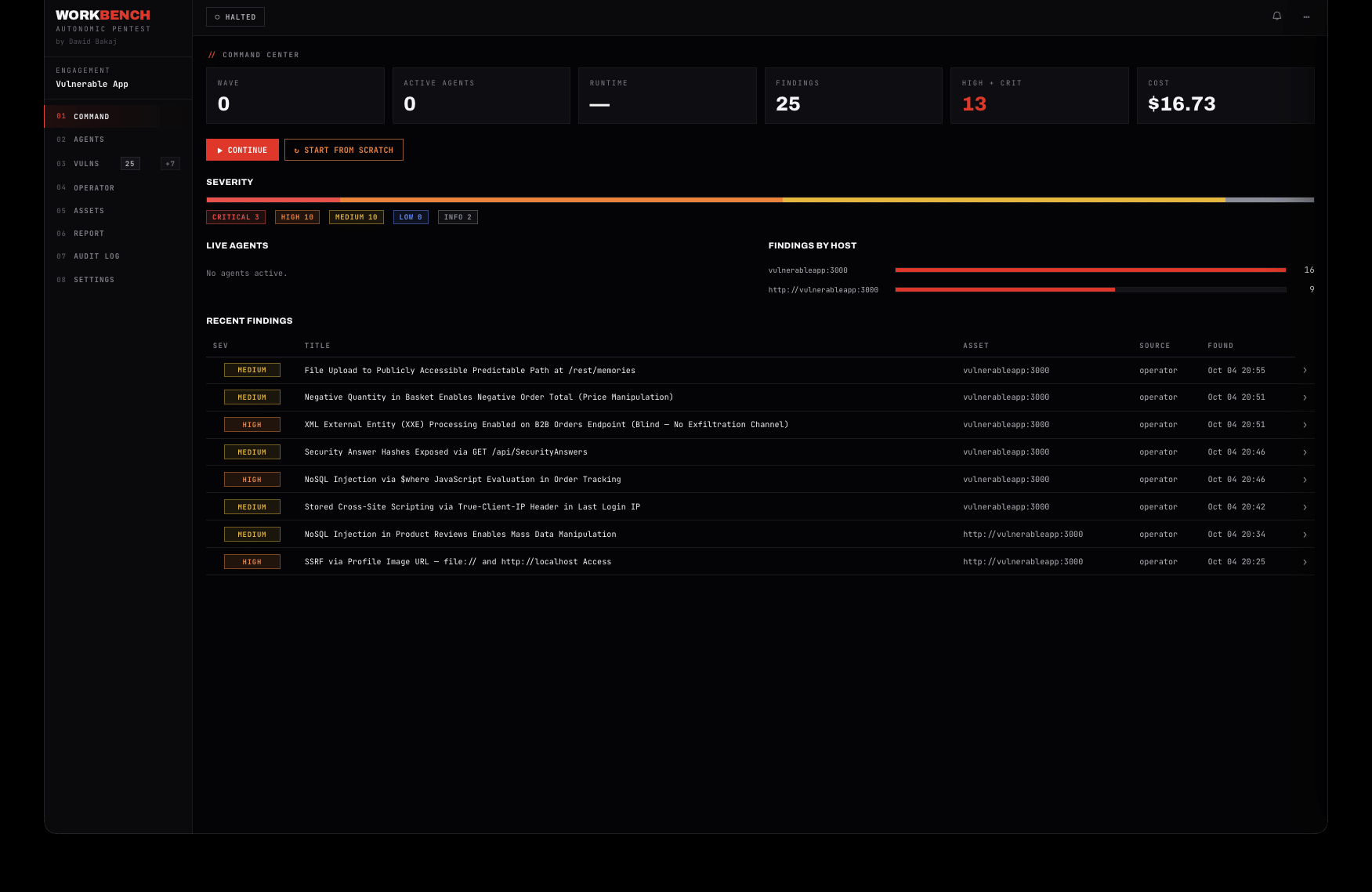
A single run goes from setting the boundaries all the way to a finished report. Below are screenshots from the live platform — the target is a deliberately vulnerable application in an authorized lab.
You start with boundaries
You set targets, exclusions and the exploitation level before the start. Denial-of-service attacks are disabled by default.
- Targets and exclusions
- Exploitation level
- Privilege profile
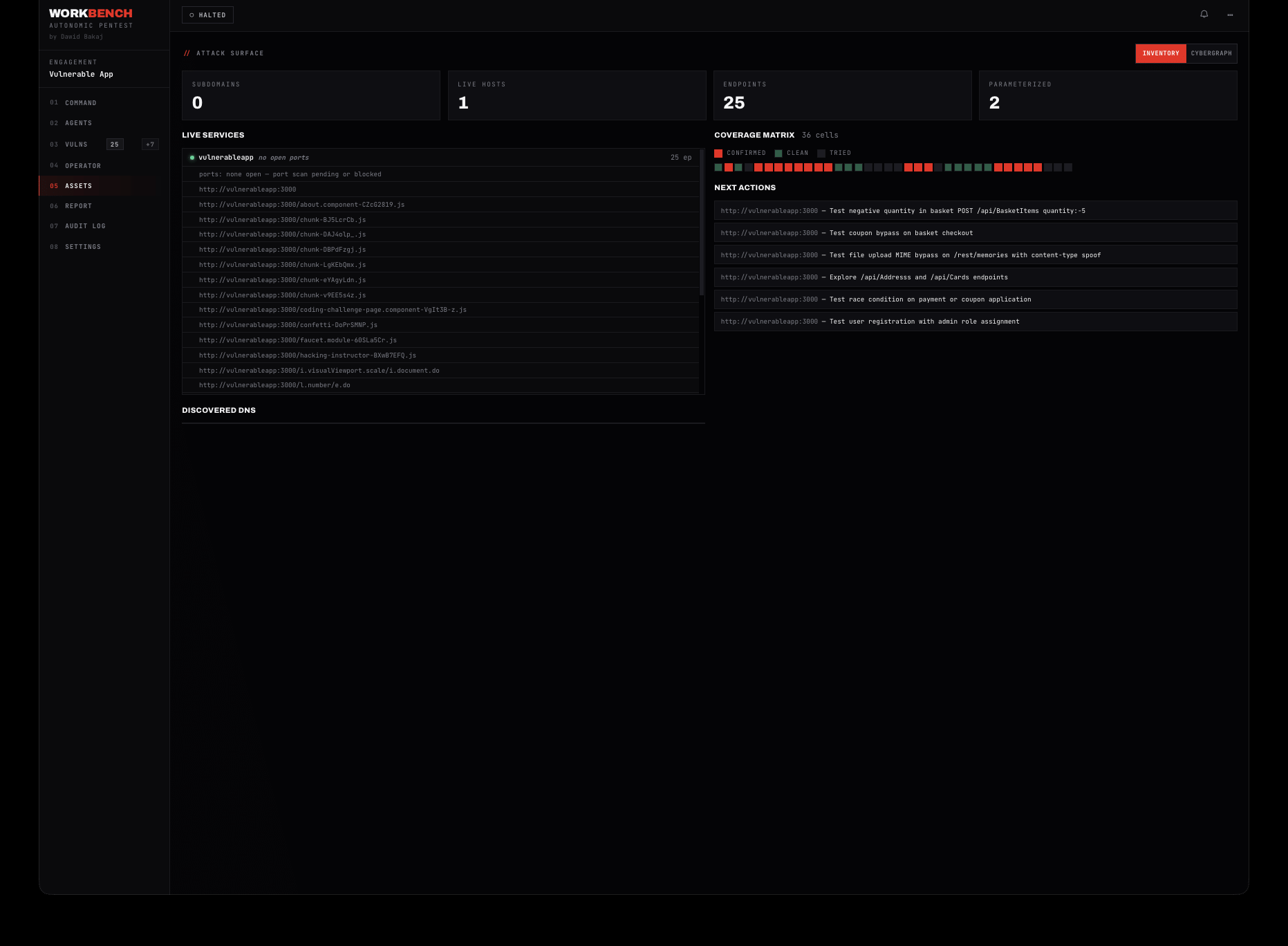
Maps the attack surface
The swarm collects subdomains, hosts, services and endpoints, and the coverage matrix shows what has already been checked.
- Asset inventory
- Coverage matrix
- Action queue
Proves, doesn’t guess
Every finding with a proof-of-concept, a CVSS score and a recommendation. A separate step screens out false positives.
- A PoC for each one
- CVSS and vector
- “Verified” status
Shows the real path
Hosts, services, credentials and findings in one graph — exposure as paths, not table rows.
- Attack graph
- Risk rings
- One view of the estate
Delivers a finished result
Executive summary, scope, methodology and findings with evidence — exported to a report ready for the client and the auditor.
- Summary and scope
- Findings with CVSS
- Report export
One engine. Many kinds of tests.
WORKBENCH runs tests autonomously, while you choose the scope and depth. From a single application to an entire infrastructure and cloud.
Application security
The full cycle: from a map of features to exploiting vulnerabilities in business logic.
Application securityPenetration testing →Web applications and API
OWASP Top 10, access control, injection, IDOR and API vulnerabilities — including authenticated (greybox) testing with multiple roles.
Web · API · greyboxWeb application testing →Network infrastructure
External and internal testing: from internet-facing exposure to lateral movement inside the local network.
Internal + externalInfrastructure testing →Red team operations
Scenarios close to a real attack, carried out within agreed rules.
Red team opsRed Team →Cloud testing
Configuration, identities and permissions in AWS, Azure and GCP — escalation paths in the cloud.
Cloud pentestCloud penetration testing →Reconnaissance and OSINT
Mapping subdomains, assets and leaks — the full picture of the attack surface before someone else does it.
Recon & OSINTOSINT & reconnaissance →- 0steps from scope to report
- 0%critical success rate
- 0%false positive check
- ∞unlimited agent dispatch
An isolated execution runtime.
The whole platform runs on a dedicated server or virtual machine that you control. Tools are launched by an isolated Docker container (pentest-toolbox) or a runtime on the host — the backend only orchestrates them.
SHARED FILE SYSTEM — one store that every agent reads from and writes to. Findings, dumps and artifacts in one place.
“Full autonomy and decision-making. The agent sets its own priorities based on signals from the engagement — what it has already found, what looks promising and where the path leads. When the first attempt fails, it adapts the plan and directs power to where it really leads to the objective. You set the boundaries — it picks the next move.
— the principle WORKBENCH is built on
Cybergraph.
Every host, service and finding from a run is stored and typed. The next run starts from what you already know — instead of scanning everything from scratch.
Traversal
Relationships map to MITRE ATT&CK techniques, and a finding points to a specific vulnerability. The graph links the whole estate into one searchable whole.
Human in the loop. You decide.
Autonomy doesn’t mean “unsupervised”. In interactive mode the swarm asks about key decisions, and you can steer the run at any moment — with an ordinary conversation.
The agent asks before it acts
At key forks the swarm pauses and waits for your approval. You pick one of the suggestions or type your own command — nothing important happens without you.
- Pauses at the intrusiveness threshold
- Ready-made options or your own answer
- Full decision context on screen
Steer the run with a conversation
The operator-agent chat works like a conversation with the person running the test. Ask about status and priorities, set the next actions, add or change the scope and authentication profiles — mid-run.
- Status and priorities on demand
- Change scope and auth profiles
- Set the next actions on the fly
Autonomy that never slips out of control.
Offensive power only makes sense with hard guardrails. You set the scope, permissions and boundaries before the start — the platform enforces them throughout the run.
Human in the loop and over the loop
You see every step live. At any moment you take control without killing the run.
Group kill switches
Stop one operation or every operation in a given area with a single switch.
ROE boundaries
You set forbidden actions, the exploitation level and the privilege profile before the start. DoS disabled by default.
Sandbox on your host
Tools run in the pentest-toolbox container on a machine you designate — not on our backend.
Out-of-band testing
Optional validation over OOB channels (interactsh) confirms “blind” vulnerabilities.
ProxyGuard
The option to route agent traffic through a Burp or Caido proxy — full visibility and interception.
Persistent audit log
Every command, approval and artifact with a timestamp. You can replay the run step by step.
Your backend and database
You can keep the backend and data on your side — in a private cloud or on-premise.
Deploy anywhere.
Nothing has to leave your network. The same engine runs as SaaS, in a private cloud and fully on-premise.
SaaS
We host the platform. The tools still run on your side.
Private cloud
Credentials and findings stay in your environment.
On-premises
Nothing leaves your network. A fully air-gapped option.
Our operator
We run the test on your authorized target — you get the result and the report.
Your model. Your API cost. Your tools.
Any model backend
You connect your own account and pay for tokens directly on your side. You separately choose the model for the “mastermind” and for the specialists, as well as the reasoning effort level. We provide the platform, the agent swarm, reporting and updates.
- Claude · Anthropic
- OpenAI
- OpenRouter
- Local · Ollama / llama.cpp / vLLM
Built-in tools (pentest-toolbox)
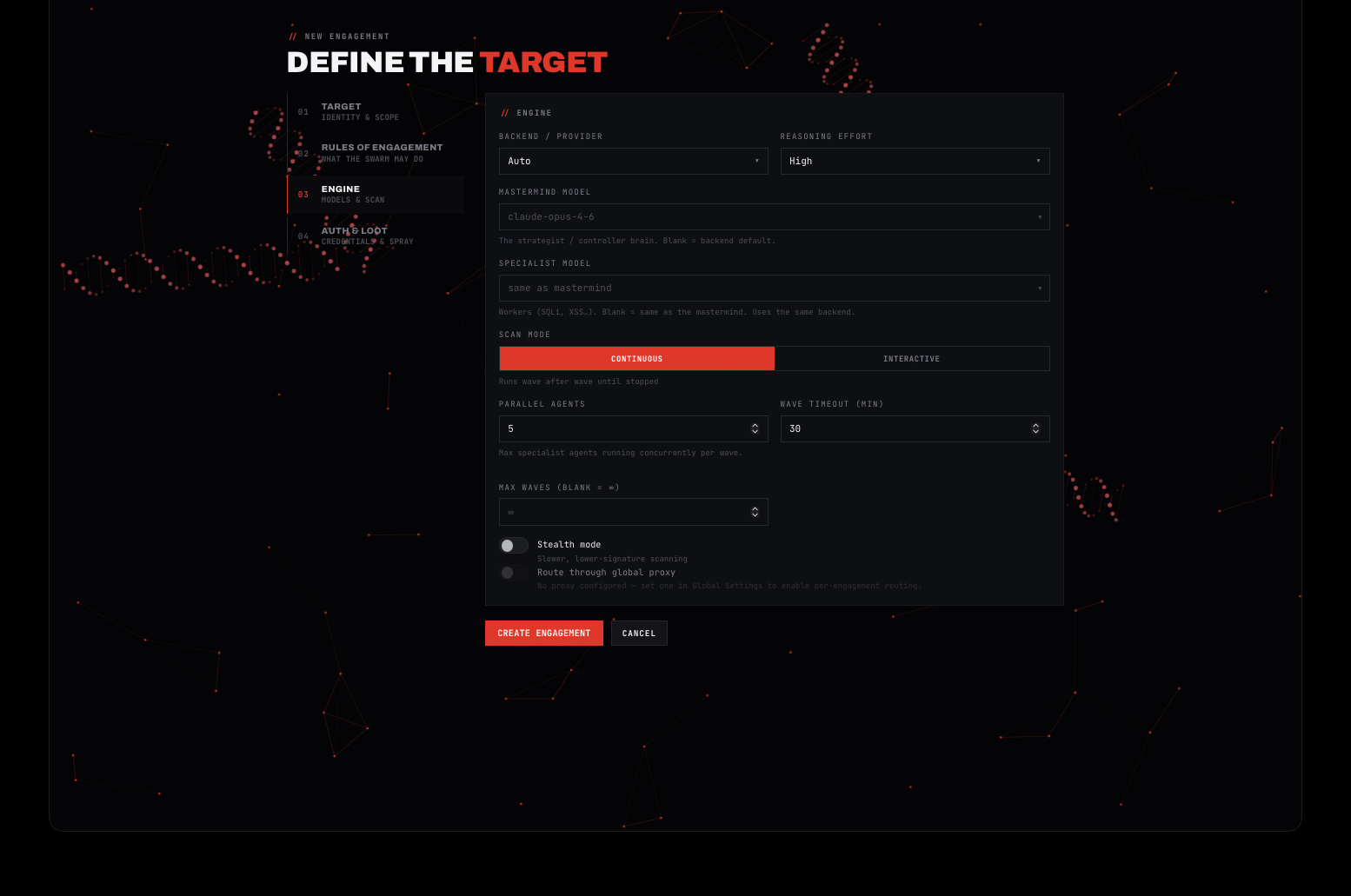
You tune the engine for the task: backend, mastermind model, specialist model, working mode, the number of parallel agents and the wave and time limits. The platform configures itself to keep costs in check.
Who WORKBENCH is for.
Security teams and CISOs
Run autonomous penetration testing on systems you designate yourself, in your own environment. Check your exposure more often than your team’s calendar allows.
Request a demoPentesters and red teams
Hand reconnaissance and repetitive exploitation attempts to the swarm, and focus on attack chains and interpretation. More engagements with the same team.
Try itSoftware houses and IT providers
Build repeatable security testing into your release cycle and show clients proof that the application was tested offensively — on your infrastructure.
Let’s talkFrequently asked questions
Didn’t find your answer? Write to us — we respond within one business day.
Ask your own questionCan this tool disrupt production systems?
Yes, we cannot rule it out. WORKBENCH was built for maximum effectiveness and efficiency, so there is no way to guarantee that the actions taken by the agents will not disrupt a system. That is why on production systems we recommend working in interactive mode (human-in-the-loop) — the agent pauses and waits for your approval before critical steps — rather than continuous mode. In addition, the default profile is non-destructive (proof-only), and denial-of-service attacks remain disabled.
How is autonomous penetration testing different from a vulnerability scanner?
A scanner matches software versions against a database of known bugs and returns a list of “possible” issues, some of which do not exist. WORKBENCH runs an autonomous test: a swarm of AI agents maps the attack surface, forms hypotheses, tries to actually exploit vulnerabilities and chains bugs into scenarios. Every finding gets a proof-of-concept, a CVSS score and a recommendation. That is the difference between a list of warnings and a confirmed path to the objective.
Does it replace a human pentester?
No. The platform accelerates and scales your team’s work: it takes over reconnaissance, repetitive exploitation attempts and report assembly, while the operator controls the scope, approves actions and interprets the result. A human sees every step and can take control or stop the run at any moment.
Which AI model does the platform use and who pays for the API?
You choose the model. You get WORKBENCH as a SaaS license — you connect your own provider: Claude (Anthropic), OpenAI, OpenRouter or a local model (Ollama, llama.cpp, vLLM). You settle token costs directly with your provider. We deliver the platform and updates; you pay for the API only for what you actually use.
Can I run the platform in my own infrastructure or offline?
Yes. The execution tools run in a container (pentest-toolbox) on a host that you designate yourself — not on our backend. You can deploy the platform as SaaS, in a private cloud, fully on-premise, and with a local model even in an environment cut off from the internet.
How does the platform enforce the test boundaries (ROE)?
Before the start you define the Rules of Engagement: targets and exclusions, forbidden actions (denial-of-service disabled by default), exploitation level and privilege profile. Above the agreed level the agent pauses and waits for your approval. You also get group kill switches and a persistent audit log with every command.
Do findings include evidence and are they verified?
Yes. Every finding includes a proof-of-concept, the affected components, the outcome and a remediation recommendation, and a separate step screens out false positives. Unconfirmed vulnerabilities are flagged, and confirmed ones get a “verified” status.
Is it safe for production environments?
The platform is intended solely for testing targets that you authorize yourself, and it operates within ROE boundaries. The default profile is non-destructive (proof-only), DoS is disabled, and secrets touched by the agent are masked before they reach a log or report.
What does licensing and pricing look like?
We sell WORKBENCH on a SaaS model as a license for the platform; you cover the API cost of your own model separately with your chosen provider. We tailor the license scope to the number of operators and the deployment method. Write to us for a quote and demo access.
Time is running out. For attackers too.
We’ll show you the WORKBENCH platform on a sample, authorized target and choose the deployment model together — SaaS, private cloud or on-premise. You’ll also get a license quote and a list of what we need to get started.
- Request confirmationWe reply within 24 h on business days and ask about your target and environment.
- A call and a demo under NDAWe show the platform on an authorized target and agree on the deployment model.
- License quote and accessWe tailor the scope to the number of operators and the deployment method. No obligation.
- Your AI model, your API cost
- SaaS / on-premise deployment
Write to us: platform demo and quote
Briefly describe what you want to test and how you want to deploy the platform. We respond within one business day.